From NFC Link Changes to Analytics: Operating Merchandise with VVFY HUB
Explore the actual VVFY HUB interface: product URL settings, date and product filters, device and browser analytics, an IP-based location map, Excel exports and brand access controls.
Operating NFC merchandise continues after distribution. A pop-up link may need to become a shopping link, a new season may bring new content, and the team needs to see which products generate visits.
VVFY HUB manages destination URLs and visit analytics for NFC merchandise by brand. Each NFC chip stores a fixed hub URL, while the operator manages destinations and statistics in the hub. Production can also begin with the hub URL before the final landing page is ready.
This guide uses the actual VVFY HUB interface updated in September 2026. The
vvfy-demobrand, product names, visit counts and locations are dummy data created to explain the features, not customer campaign results. Screenshots show the Korean interface.
1. Manage products and links within each brand
NFC keyrings, cards and membership merchandise can each have a different destination under the same brand. The product list shows each name and current URL, with Edit and Copy URL controls.
A seasonal keyring can open campaign information, a pop-up card can open an event page, and membership merchandise can open brand content. The team can check the assigned links in one place.
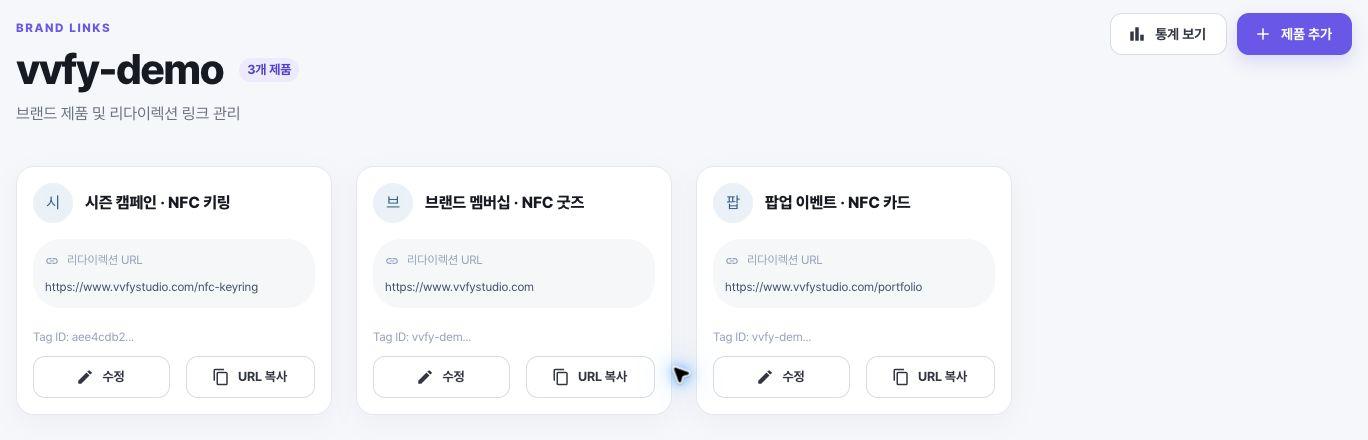
The actual product management screen, populated with example products and links.
2. Change the destination while keeping the distributed NFC unchanged
The hub separates the address stored on the NFC chip from the final destination.
NFC merchandise → Fixed VVFY HUB URL → Currently configured destination URL
The Edit product screen lets an operator change the product name and redirect URL. The fixed URL stays the same. Merchandise originally programmed with a hub URL can therefore point to new content without being collected or rewritten.
For example, a pop-up information page can become a shopping page after the event, then a new seasonal experience. An NFC chip already locked with a direct external URL cannot be updated remotely in this way, so decide whether to use a hub before production.
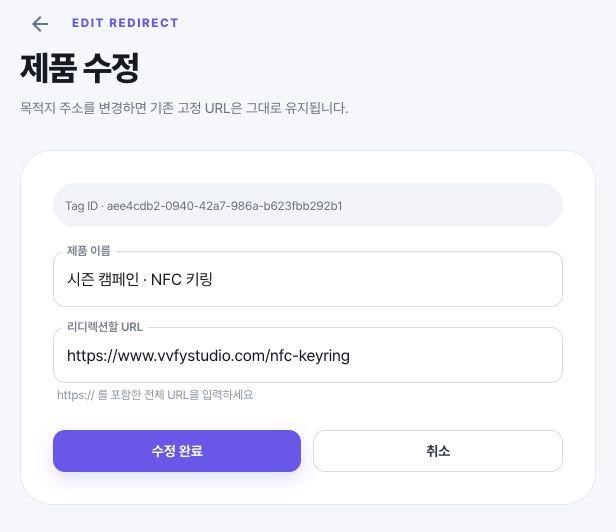
Change the destination in the product editor while retaining the fixed URL stored on the chip.
3. Filter analytics by date and product
Choose Today, 7 days, 30 days or 90 days, or enter a start and end date. The product filter supports all products or multiple selected products, making it possible to inspect the whole brand or a specific group of merchandise.
The summary shows total visits, average daily visits and the top product. Daily trends and hourly distribution help identify when visits to the hub were concentrated during a campaign.
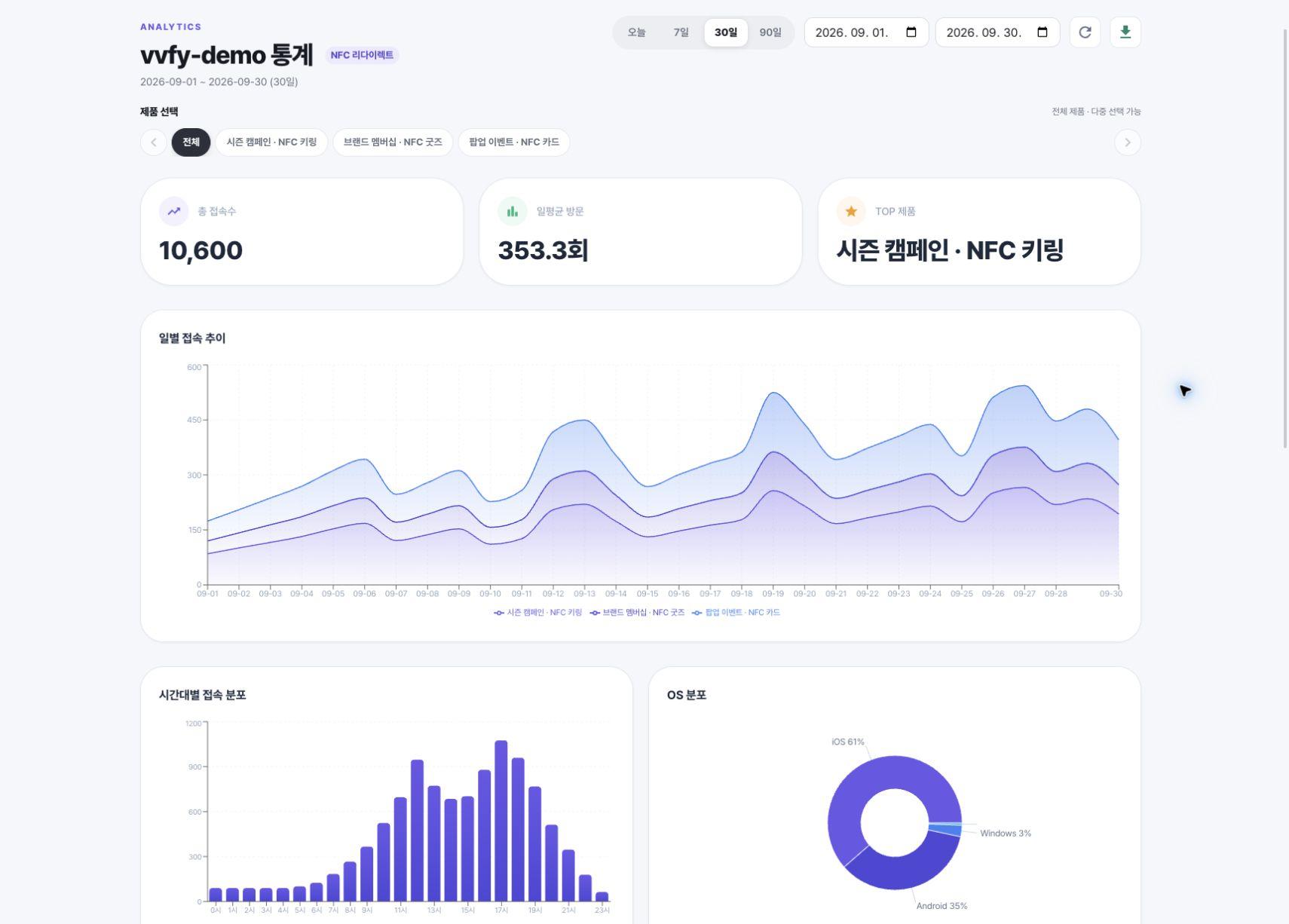
Example data for September 1–30. The 10,600 visits are illustrative figures only.
4. Compare products and access environments
The product statistics table shows total visits, daily averages and each product's share of visits. Compare how often the links for a keyring and a card were opened, and use that information when planning the next content update.
OS, browser and device breakdowns also help prioritize landing-page checks across iOS, Android, Safari, Chrome, mobile, desktop and tablet environments.
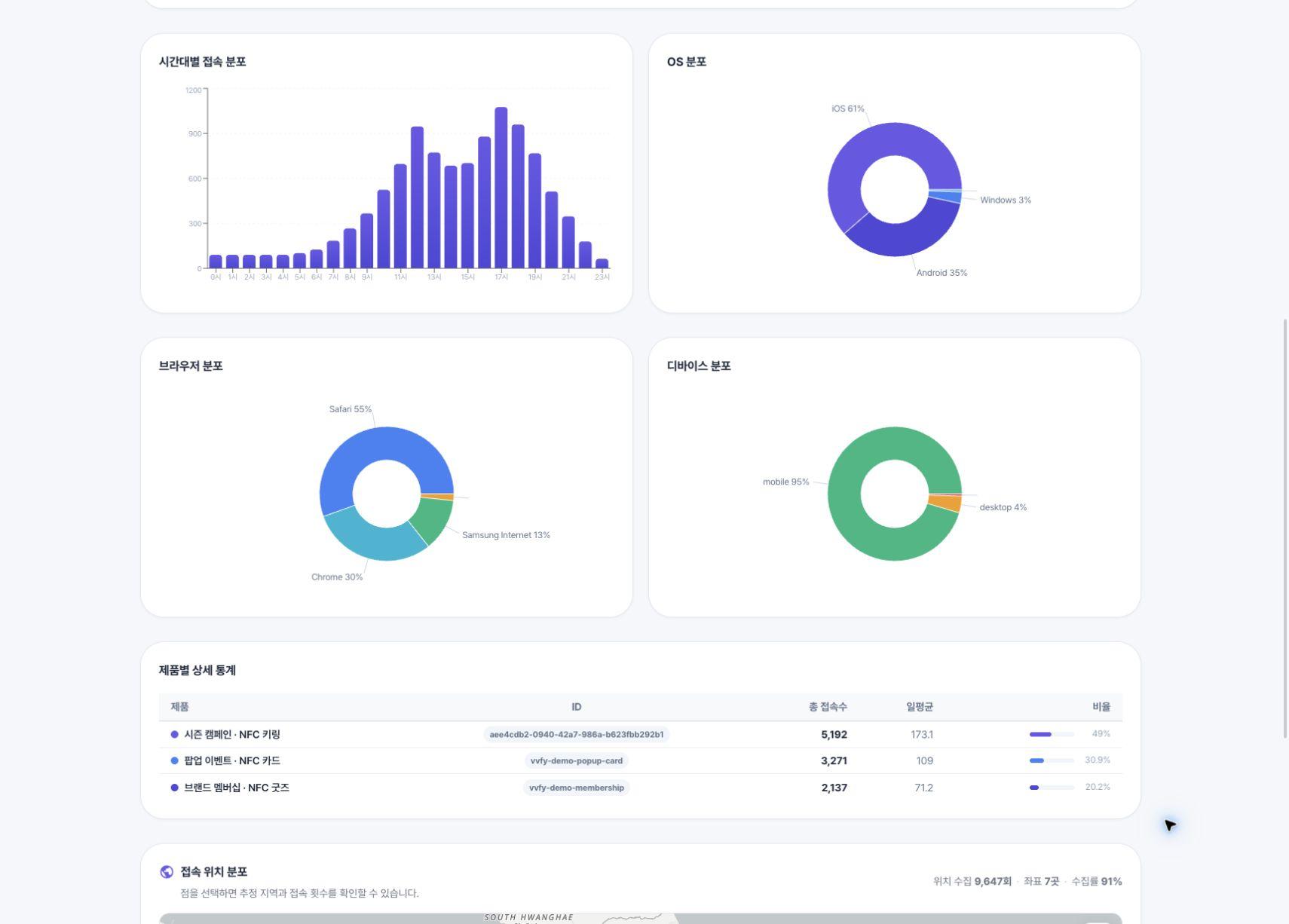
Product visits and access environments shown with dummy data.
A visit counts an access to the hub page. One person can visit more than once, and shared ordinary hub URLs can also generate visits. These counts are not unique visitors, verified physical NFC taps, purchases or confirmed successful openings of the destination page or app. Different product distribution quantities also mean that visit counts alone do not establish response rates.
5. Inspect the location map and export to Excel
The visit location map displays collected locations. Select a point to see its estimated area and visit count. The screen also shows the number of visits with location data, coordinate count and collection rate.
Locations are approximate and IP-based, not GPS-based. Mobile carrier networks, VPNs and public Wi-Fi can make them differ from the actual location, and some visits have no location data. Use the map to understand broad regional patterns rather than individual customer movements.
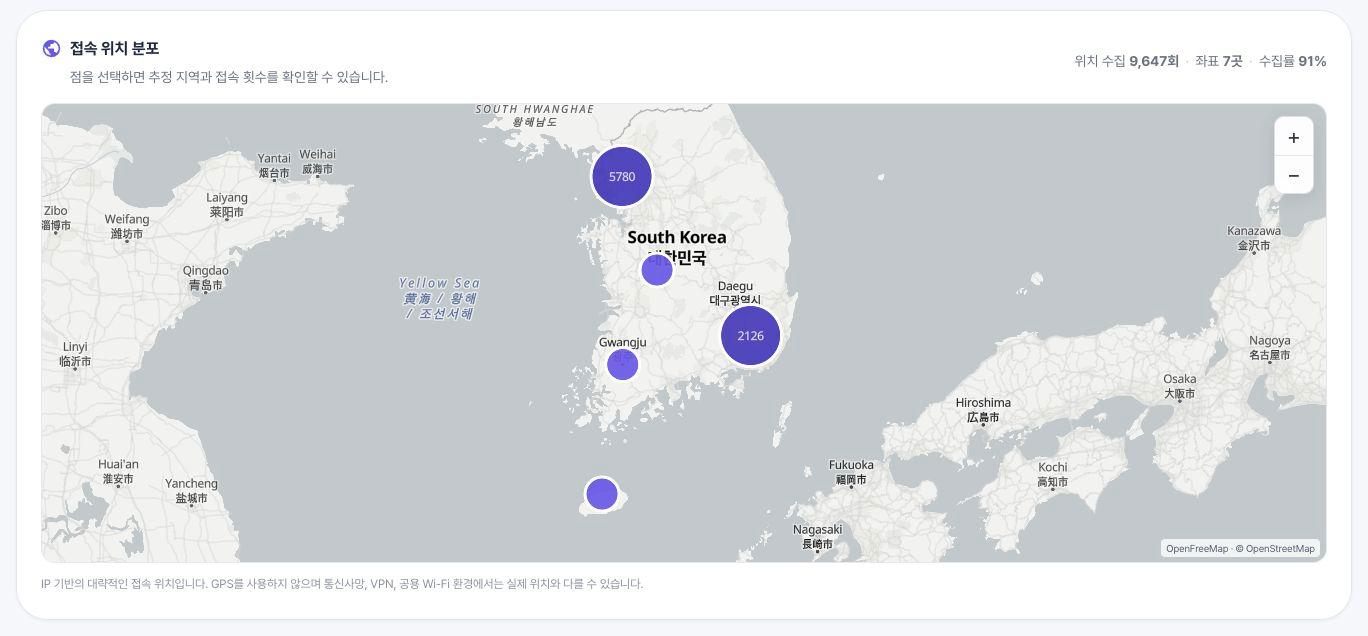
Example locations placed around Seoul, Busan and other areas; these are not real customer locations.
Use Excel download at the top right of the analytics screen to export the currently queried summary, daily statistics and product statistics. Select the date and product conditions first, then use the file for internal reporting or campaign reviews.
6. Set the brand access each operator needs
Brand managers access the products and analytics of their assigned brands. Administrators can manage roles, accessible brands and product registration limits through Accounts and permissions, dividing responsibilities across multiple brands.
Brand operators manage product names, destinations and analytics, while administrators configure account access. The actual service scope and operating period are agreed for each project.
Choose a direct link, hub or secure NFC
| Operational requirement | Approach to consider |
|---|---|
| A long-term fixed destination with no separate link management | Write the final URL directly to NFC |
| Destination changes after production and date/product analytics | Route through VVFY HUB |
| Content restricted to physical merchandise holders or persistent NFC-specific state | Secure NFC with authentication and content design |
The hub manages links and visit data. Writing a hub URL to ordinary NFC does not itself authenticate possession of the physical product. For holder-only content, also review secure NFC versus standard NFC.
Before contacting us, outline the first destination, whether it will be ready before production, planned link changes, products to manage, required analytics and operating period. Contact VVFY STUDIO to plan production and post-distribution operation together.
Related reading
Shall we build your brand NFC project together?
Let's create something new for your brand with VVFY STUDIO.
Start a project consultation